AI Won't Make You a Better Engineer
Table of Contents
TL;DR
- AI is reshaping engineering workflows fast, and yes, that should worry us.
- The biggest risk is not replacement, it’s skill atrophy: fewer mistakes made by humans means fewer chances to build judgment.
- AI-generated code is often fast but surface-level, overconfident, and expensive to review at scale.
- AI is excellent for contextual search and rapid prototyping when code quality is not the end goal.
- Use AI deliberately: protect deep work, mentoring, and low-level understanding.
- Practical guardrails matter: where AI helps, where it hurts, and what to keep human.
AI won’t make you a better engineer out of the box. It might make you faster. It might even make you look 10x on a dashboard. But speed is not a skill.
The Part That Should Scare Us
Permalink to "The Part That Should Scare Us"AI will absolutely change this industry. Maybe it’s already late to start worrying, but there is still time to rethink how we use it. The part that worries me most is not replacement. It’s growth.
What makes a senior engineer is not just output. It’s judgment. And judgment comes from:
- Making your own mistakes
- Learning from those mistakes
- Learning from other people’s mistakes
Now we’re entering a world where fewer mistakes are made by people, because AI makes them first. And when people do make mistakes, AI often patches them instantly. Teams gain velocity. Individuals lose reps.
By reps, I mean the exact things that build engineering instincts:
- Debugging from first principles
- Reading unfamiliar code until it clicks
- Choosing trade-offs under pressure
- Profiling and fixing real performance problems
- Explaining why a solution is the right one
The Seniority Gap
Permalink to "The Seniority Gap"If this trend continues, we’ll ship more, but we’ll grow fewer deep engineers.
That’s the trade-off nobody wants to discuss.
When everything is solved for you, you stop building the mental models that let you solve hard problems under pressure. You lose the sixth sense for where things usually break.
Example: if someone says a tap on iOS unexpectedly zooms the page, experienced frontend engineers immediately suspect an input with font-size < 16px. If a backend starts behaving strangely right after deploy, experienced engineers quickly check cache layers (Redis, stale keys, invalidation gaps) before chasing random theories.
That pattern recognition only comes from repeated exposure. AI can speed up delivery, but it can also remove the exact reps that build this instinct.
My Holiday Experiment
Permalink to "My Holiday Experiment"This wasn’t theoretical for me. I tested this on an app I know very, very well. I gave AI a detailed prompt and asked it to implement a feature. It generated a lot of code quickly. At first glance, impressive.
I have a long and complex task you need to do. Do it slowly and with a lot of thinking. I also would like to see the plan.
I want you to focus on UX and resolving the task as a very senior engineer making the code clean and reusable.
The project is about 3D sales models for real estate, where you map buildings apartments on images so it presents and interactive map for picking an apartment.
We are adding this new functionality to map floors which is missing. Currently you can only map floor plats, so this is a cross section of a build where you map each apartment, now you need to map build floors.
You need to think how to add in the most user friendly way mapping to floors inside #file:REDUCED.vue components. It will probably work something like #file:REDUCED.vue where you can upload the SVG overlay and map floors. Maybe also think about what would be the easiest UX to maps these floors.
Look into how to adopt the existing functionality in this flow. Because you need to map also every flow to the apartment. Maybe add all new floor plates, without having an option to delete floor or add new plate like now.
Also here is an example of the SVG that maps floors, maybe map shapes to floor numbers but always have an option to override:
<svg width=“1920” height=“1080” viewBox=“0 0 1920 1080” …
I always write detailed prompts like the one above: context, required skills, and concrete examples. I do that so it can follow coding style and architecture. In practice, it still drifts more than people admit.
Then reality hit:
- The diff was huge and cognitively expensive to review
- It introduced complexity I did not ask for
- It made local decisions that violated the broader architecture
- It repeatedly drifted back to its own path, even after correction
- I spent around 1 hour reviewing for what should have been a 3-hour coding session
- I rolled back twice and removed about 800 lines total
For context, in my prime on an app I know deeply, I could produce around 1,000 lines of code in a day. AI can generate that in 30–40 seconds. But that speed creates a different bottleneck: I can’t review that much code with confidence that fast. I’m a slow reviewer, and for good reason.
Instead of getting a 10x boost, I got a slowdown: review overhead, undoing, and constant re-steering.
People say “use plan mode.” Sometimes it helps. But if I already have a precise plan in my head, down to component boundaries and implementation details, I don’t need a planner. I need execution with control.

The issue with these generated plans is that software development is rarely a perfectly linear checklist. Constraints change mid-flight. Assumptions break. Requirements move. When that happens, rigid AI plans collapse quickly.
What I often get is execution without control.
Overconfidence Is the Real Bug
Permalink to "Overconfidence Is the Real Bug"People compare AI to a junior engineer or an intern. I get the analogy, but there is one massive difference: AI is overconfident.
A junior usually asks questions:
- “Can I do it this way?”
- “Is this trade-off acceptable?”
- “Should I optimize this now or later?”
That dialogue is how mentoring works. That dialogue is how people become senior.
With AI, the wrong implementation can arrive fully formed, confidently, and at scale. And because it arrives fast, teams accept it fast.
There is another issue: AI is optimized to answer, even when it should admit uncertainty. If it doesn’t know, it still tends to generate something that statistically looks right. That is dangerous in engineering, because plausible is not the same as correct.
I’d rather use a less confident model that says “I don’t know” more often, but is more accurate when it does answer. We would be in a much better place if AI had less pressure to know everything and more permission to be uncertain.
Concrete example: I was adding a new view mode (from the prompt above), and one requirement was SVG upload for that mode. Here’s a simplified version of the real save logic:
const saveView = () => {
  if (!currentView.value) return;

  let overlaySVG = '';

   if (mappingMode.value === 'units') {
    overlaySVG = currentView.value.unitSVGOverlay || '';
  }

  emit('save', view);
};
I hit a save bug and told Opus 4.6 that the SVG wasn’t being updated. The obvious place to look was this function. It looked there, but couldn’t connect the dots, so it did what AI often does: throw more code at the problem.
Two or three minutes later, it generated almost 100 lines, imported DOMPurify, and added complex parsing/sanitization logic.
The fix? One condition. Line 6 was checking only the old mapping mode.
We’re Writing Code for Machines
Permalink to "We’re Writing Code for Machines"Another uncomfortable observation: many codebases are becoming harder for humans to reason about.
Not because engineers suddenly got worse, but because generated code often optimizes for “works now” over “understandable later.”
I’m not saying generated code is always bad. I’m saying it often optimizes for immediate passability, not long-term readability.
You can merge a 600-line generated change in minutes. But can your team maintain it in six months?
It usually refactors only when you explicitly ask for it and feed it simplification ideas.
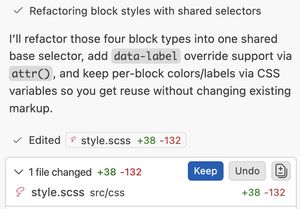
But for that to happen, you need to know what good looks like and, more importantly, care enough to demand cleaner code.
Another real example: I asked AI to help position labels over an SVG so they stay aligned while scaling.
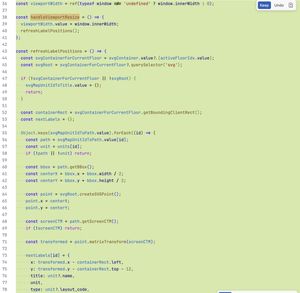
It looked correct at first glance. Visually, it worked. But under the hood, it was heavy: extra logic on every resize, getBoundingClientRect() calls that create unnecessary layout thrashing. It added almost 50 lines of JavaScript for something that could have been solved with a simpler CSS-first approach.
That question matters more than the demo velocity.
Where AI Is Actually Incredible
Permalink to "Where AI Is Actually Incredible"I’m not anti-AI! For context, I use private Claude Code for consulting, and at work I have unlimited access to all major models. Opus 4.6 goes brm brm. I spend hours with AI every day, testing as many real-world use cases as I can.
Two use-cases are objectively great for me.
1) Contextual codebase search
Permalink to "1) Contextual codebase search"For huge codebases like Chromium, this is unreal.
I can ask for a feature flow, component hierarchy, and where values are set, and get a useful map in minutes. Traditional search is great when you know exactly what to look for. AI search helps when your reference point is far away or fuzzy. Used this way, I’m not losing knowledge. I’m gaining it faster.
2) Prototypes and test benches
Permalink to "2) Prototypes and test benches"For proofs of concept, AI is absurdly productive.
When I want to validate an idea quickly, I don’t care if the chart library choice is perfect or if the CSS is elegant. I care about getting signal fast. This is exactly how I built several cache stress-test benches for my recent post. What used to take much longer can now be assembled in minutes.
For prototyping, AI is a superpower.
More examples and ideas coming in the future blog posts.
The Hot Take
Permalink to "The Hot Take"AI should probably not write the parts of your system that teach you how your system works.
Use it for acceleration, not substitution. Use it to explore, not to outsource your engineering brain.
There is another problem the whole industry is facing right now: everyone can code prototypes.
I’m seeing PMs and EMs build working demos in hours or days, and then apply that same expectation to product teams. That creates a distorted picture of what “done” means and pushes teams toward shallow speed.
AI is a powerful accelerator. It is an amazing prototyper. It has never been easier to test ideas. In many cases, I don’t even search anymore, I ask AI to generate an experiment so I can test a hypothesis quickly.
But prototype velocity is not product velocity. Shipping production software still means edge cases, maintainability, observability, performance, security, and long-term ownership.
How to Use AI Without Losing the Plot
Permalink to "How to Use AI Without Losing the Plot"If your goal is long-term engineering quality, here are practical guardrails that work for me:
- AI is the best you’ll ever have when you’re stuck in a messy debugging loop.
- Use AI for search, scaffolding, and experiments
- Keep core architecture and critical paths human-led
- Prefer smaller diffs and tighter prompts over giant one-shot generation
- Review generated code in chunks, not in one massive pass
- Force a simplification pass before merge: “Can this be 30% smaller and clearer?”
- Keep juniors on first-principles debugging, not only prompt orchestration
- Treat “I don’t know” as a feature, not a failure
This is less about tools and more about training loops. Protect the loops that make engineers better.
Conclusion
Permalink to "Conclusion"AI is here, and it’s powerful. It will change workflows, team structures, and hiring expectations.
But if we blindly optimize for short-term velocity, we risk long-term skill degradation, weaker mentoring loops, and codebases that humans struggle to own.
Use AI, absolutely. Just use it with intent:
- Protect deep work
- Protect learning-by-doing
- Protect review quality
- Protect the path to seniority
Otherwise, we may ship faster while quietly losing the people who know how to build software that lasts.
Comments
Join the discussion via GitHub Discussions.